In the first post, I covered how I got the Blackstone Connect API to stream temperature data into Grafana Cloud. That gave me dashboards, graphs, and alerting.
The thing is, during a cook, I’d still have to open Grafana on my phone, navigate to the dashboard, look at the graph, and try to figure out when my brisket would hit 203°F. What I really wanted was something I could just ask a question to from the backyard.
So I built a Telegram bot that sits on top of the same Prometheus data, runs linear regression, pulls live weather data, and pipes everything through an LLM. Here is how it works.
Why Telegram?
I considered a few options (custom web app, Slack bot, push notifications via Grafana) but Telegram won for practical reasons:
- It’s already on my phone, no extra app to install.
- The bot API is simple,
python-telegram-bothandles all the boilerplate. - It supports rich text, inline keyboards, and markdown, good enough for temperature readouts.
- It works from anywhere, my wife can check the cook status too without needing Grafana access.
The bot runs via docker-compose on a VPS. More on that later.
Architecture
The Telegram bot doesn’t talk to the Blackstone API directly. That’s still main.py’s job, it keeps polling the grill and pushing metrics to Grafana Cloud. The bot reads from Prometheus (Grafana Cloud’s query API) and adds the intelligence layer on top.
Here is how the pieces fit together:
┌─────────────────────┐
│  Blackstone Grill   │
│  (WiFi, 4 probes)   │
└─────────┬───────────┘
          │ Blackstone Cloud API
          ▼
┌─────────────────────┐
│     main.py         │──── Polls every 60s, converts °C→°F
│  (Data Collector)   │
└─────────┬───────────┘
          │ InfluxDB line protocol
          ▼
┌─────────────────────┐
│   Grafana Cloud     │
│   (Prometheus)      │
└────┬───────────┬────┘
     │           │
     │ PromQL    │ Dashboard
     ▼           ▼
┌──────────┐  ┌──────────────┐
│ Telegram │  │   Grafana    │
│   Bot    │  │  Dashboard   │
└──┬───┬───┘  └──────────────┘
   │   │
   │   │ Context + Question
   │   ▼
   │ ┌──────────────┐
   │ │    LLM       │
   │ │              │
   │ │              │
   │ └──────┬───────┘
   │        │ Answer
   │◄───────┘
   │
   │ Weather data
   ▼
┌──────────────┐
│  Open-Meteo  │
│  (Weather)   │
└──────────────┘
The bot queries Prometheus for the last N minutes of data, runs its own analysis (linear regression, probe scoring, stall detection), builds a context string, and sends it all to the LLM along with the user’s question.
The Commands
The bot exposes a handful of slash commands:
| Command | What it does |
|---|---|
/status |
Current temps for grill + all 4 probes, with trend arrow |
/eta 203 |
“When will I hit 203°F?” - linear regression + LLM analysis |
/remaining 165 |
Same as /eta, just different wording |
/history 60 |
Last 60 minutes of temp data, mini ASCII bar chart |
/stall |
Detects if you’re in the dreaded 150-170°F plateau |
/probe |
Reliability scores for all 4 probes, auto-selects the best one |
/setprobe 2 |
Override auto-selection, lock to Probe 2 |
/weather |
Current weather in Greer, SC + impact on your cook |
/ask <anything> |
Free-form question with full data context |
You can also just type a question without any command and the bot will pick it up and answer using live data.
Smart Probe Selection
I didn’t plan this one but it ended up being pretty essential. I have 4 probes but rarely use all of them. Sometimes one is dangling off the grill doing nothing, sometimes one has a flaky connection. I don’t want ETA predictions based on a dead sensor reading ambient temperature.
The bot scores each probe on 5 criteria:
- Temperature range - Is it between 32-500°F? (+30 points)
- Variance - Is the reading actually changing? A stuck sensor gets zero. (+20)
- Smoothness - How big are the jumps between consecutive readings? Erratic probes get penalized. (+20)
- Above ambient - A probe reading 72°F probably isn’t in meat. (+15)
- Data completeness - More data points = more reliable. (+15)
The probe with the highest score out of 100 gets used for all calculations. You can see the breakdown with /probe:
If the auto-selection picks the wrong one (it happens, maybe you just inserted a probe and it hasn’t warmed up yet), you can override it:
/setprobe 2     → Lock all calculations to Probe 2
/setprobe auto  → Back to automatic
The override is per-chat, so my wife and I can each track different probes from our own Telegram.
Temperature Prediction
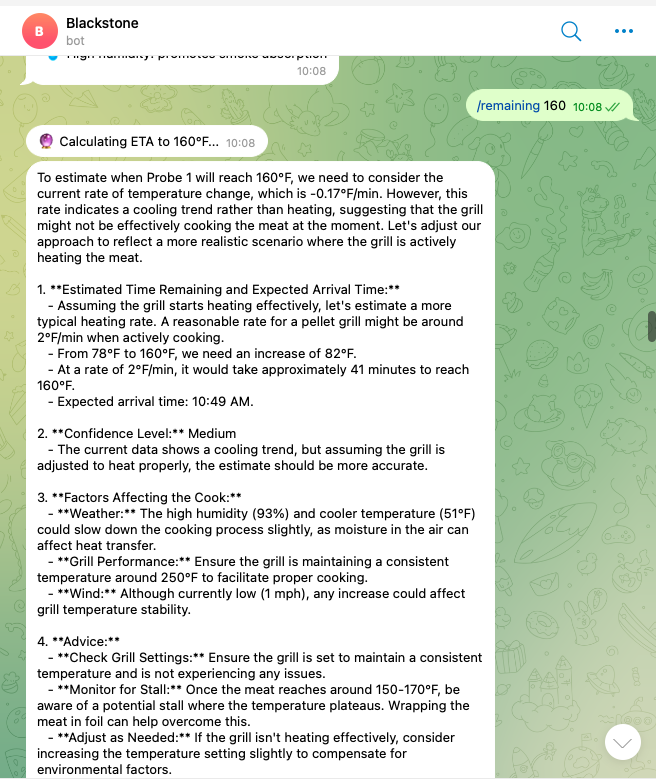
The ETA prediction is the feature I use the most. “When will this be done?” is the question during any long cook.
The approach is straightforward: take the last 30 minutes of data, run linear regression, and extrapolate to the target temperature.
# Normalize timestamps to minutes, fit a line
t_minutes = (timestamps - timestamps[0]) / 60.0
coeffs = np.polyfit(t_minutes, temps, 1)
slope = coeffs[0]  # °F per minute
But a naive linear fit isn’t great by itself. A few things make it more useful:
Short-term vs. long-term trend. The bot computes both the overall slope (all data) and the recent slope (last 10 points). It uses the more conservative of the two.
Stall detection. If the current temperature is between 150-170°F and the rate drops below 0.5°F/min, the bot flags it as a stall. The stall can add hours to a cook if you don’t wrap.
Confidence scoring. The bot computes R² (goodness of fit). High R² with lots of data points = high confidence. Noisy data with few points = low confidence. This gets passed to the LLM so it can caveat its answer.
LLM on top. The raw regression numbers are a starting point. The LLM gets all of this data plus the current weather (wind, humidity, outside temperature) and combines it with BBQ knowledge. Wind at 20 mph? It knows that means heat loss and will adjust the estimate.
Weather Integration
Outdoor cooking is weather-dependent. A 15 mph wind or 35°F ambient temperature will slow your cook noticeably. The bot pulls weather data from Open-Meteo (free, no API key needed) with OpenWeatherMap as fallback.
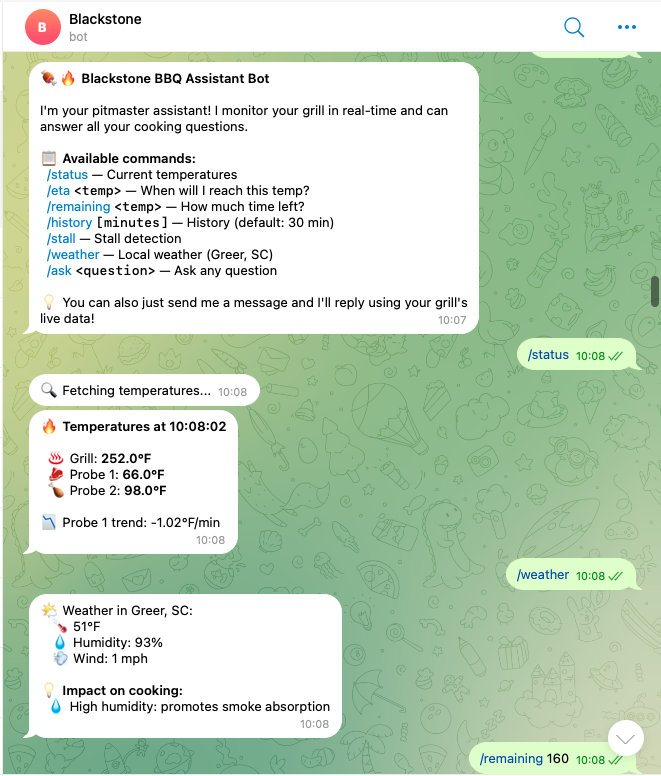
The /weather command shows conditions and directly tells you the impact:
- Cold temps → more pellet consumption, slower cook
- High wind → heat loss, shield your grill
- High humidity → better smoke absorption
- Dry air → meat dries out faster, consider spritzing
This data also gets injected into every LLM prompt, so when you ask “when will my brisket be done?”, it factors in that it’s 38°F and windy outside.
The LLM Layer
Every command that involves analysis (/eta, /stall, /ask, and free-form messages) goes through an LLM. The system prompt gives it a specific role and specific data:
BBQ_SYSTEM_PROMPT = """You are an expert BBQ Pitmaster and intelligent cooking assistant.
You are monitoring a Blackstone pellet grill in real-time via temperature probes.
You are located in {location}.

Current weather conditions:
{weather_context}

Temperature data from the last 30 minutes ({active_probe} - meat, auto-selected):
{probe_data}

Current grill temperatures:
{current_temps}

Trend analysis (linear regression on {active_probe}):
- Current rate: {rate:.2f}°F/min
- Current temperature: {current_temp:.1f}°F
{stall_info}
"""
The prompt includes the full time-series data (30 minutes of readings with timestamps), all current probe values, weather, the linear regression rate, and whether a stall was detected. Since the LLM has actual numbers to work with, the answers are pretty useful.
The nice thing is free-form queries. You can just type something like:
“Should I wrap now or wait?”
And the bot will look at your current temperature, the rate of climb, whether you’re in a stall, and give you an answer based on your actual cook data.
How It’s Deployed
The bot runs 24/7 on a Linux VPS via docker-compose. Here is the setup:
Dockerfile - Python 3.11-slim with the bot script and config:
FROM python:3.11-slim
WORKDIR /app
COPY requirements.txt .
RUN pip install --no-cache-dir -r requirements.txt
COPY telegram_bot.py .
COPY grafana_config.py .
CMD ["python", "telegram_bot.py"]
Then a docker-compose up -d and it just works. Restart policy is set to unless-stopped so it survives reboots. Logs via docker-compose logs -f.
Data Flow: What Happens When You Type /eta 203
Here is what happens end to end:
You type: /eta 203
     │
     ▼
┌─ Telegram ─────────────────────────────────────────────────┐
│  Bot receives Update, dispatches to cmd_eta()              │
└────────────────────────┬───────────────────────────────────-┘
                         │
                         ▼
┌─ build_context() ──────────────────────────────────────────┐
│                                                             │
│  1. get_best_probe(10min)                                   │
│     → Query Prometheus for all 4 probes                     │
│     → Score each probe (0-100)                              │
│     → Pick the best one (or respect manual override)        │
│                                                             │
│  2. get_probe_data(best_probe, 30min)                       │
│     → PromQL query to Grafana Cloud                         │
│     → Returns [(timestamp, temp), ...]                      │
│                                                             │
│  3. get_all_probes_latest()                                 │
│     → Current temp for grill + all probes                   │
│                                                             │
│  4. get_weather()                                           │
│     → Open-Meteo API → temp, humidity, wind                 │
│                                                             │
│  5. predict_eta(probe_data, 203)                            │
│     → Linear regression on 30min of data                    │
│     → Compute rate, R², confidence, stall flag              │
│                                                             │
└────────────────────────┬───────────────────────────────────-┘
                         │
                         ▼
┌─ ask_llm() ────────────────────────────────────────────────┐
│                                                             │
│  System prompt + all context + user question                │
│  → LLM                                                      │
│  → Returns pitmaster-style answer with ETA estimate         │
│                                                             │
└────────────────────────┬───────────────────────────────────-┘
                         │
                         ▼
┌─ Telegram ─────────────────────────────────────────────────┐
│  Send response back to chat                                 │
└─────────────────────────────────────────────────────────────┘
The whole thing takes 2-4 seconds depending on LLM response time. The Prometheus queries are fast (< 200ms each).
Things I Learned
Linear regression is surprisingly good for BBQ. Meat temperature rise is roughly linear within any 30-minute window (outside of the stall). Simple numpy.polyfit with degree 1 works great. I tried polynomial fits but they overfit on noise and gave wild predictions.
Probe auto-selection turned out to be more useful than expected. I can’t count how many times I would have been tracking a dangling probe if the bot hadn’t flagged it. The scoring catches the obvious failure modes: dead sensors, probes reading ambient, erratic connections.
Weather matters more than I thought. A 20°F drop in ambient or 15 mph winds can add 30-60 minutes to a long cook.
The python-telegram-bot library handles polling, command parsing, async execution, you just write handler functions. Went from zero to working bot in an afternoon.
I now pull up Telegram, ask “how’s the cook?”, and get an answer with actual data. Next steps? I will keep enjoying and improving the current setup as I go.